Me, I like computers. So as a learning experience, I thought decided to go ahead and try self-hosting this exact website you’re looking at right now. Fun? I guess so. Pain? included.
First up, web server. Choosing a web server wasn’t very complicated. I have tried OpenLiteSpeed (we’ll be referring to this as OLS) and NGINX to host WordPress websites so far. I found OLS to be a decent setup to host WordPress websites. I have a lightweight WordPress install running on OLS and it is using approx. ~70 MB on idle, excluding the MariaDB. But alas, I decided not to go with OLS. I have very little experience on OLS, as I only use them for very niche cases. I decided to go with NGINX instead.
I paired NGINX with PHP-FPM 8.0, running a full docker container to hold up WordPress’s needs. Docker container available here. under the package name
ghcr.io/nathanadhitya/pterodactyl-wordpress:master Long story short, I also learned how to automatically publish docker containers in Github’s Container Repository. Interesting stuff.
Next up, is the database server. I simply spun up a MariaDB container. Surprisingly works well without major config changes. Though, latency is a miss. InnoDB’s caching is set to pretty low as I’m memory limited here.
Lastly, the domain and CDN setup. Domain was bought from rumahweb.com. I have found rumahweb to offer the cheapest domain names with ID protection included. I have been a customer for a while without any issues. I use Cloudflare as the CDN and reverse-proxy. Therefore, I had to point the NS records to Cloudflare. DNS records were setup to point to my personal server IP and et voila, it works!
WordPress installation went as smooth as one would expect for a normal install. That’s nice to hear for a complete DIY solution.
Here’s a silly story. While building the website up, we found a problem. The website would occasionally stop working when someone uploads an image. Wait, an image? I wonder why.
Ah, right, WordPress compresses and scales images down with ImageMagick. Apparently, ImageMagick is memory hungry and eats quite literally any resource you throw at it. Not cool when you’re memory-limited. My server even spat a ton of OOM errors in its kernel logs. Oh boy.
At last, the mistake was identified. The docker container was assigned only 512MB of memory, while ImageMagick was trying to allocate as much as basically the entire system’s memory. Well, that explains those random crashes. So we added ImageMagick policies to limit its RAM allocation. That seems to have done the trick.
Next up, we decided that it’s not fast enough, even with Cloudflare’s default optimizations.
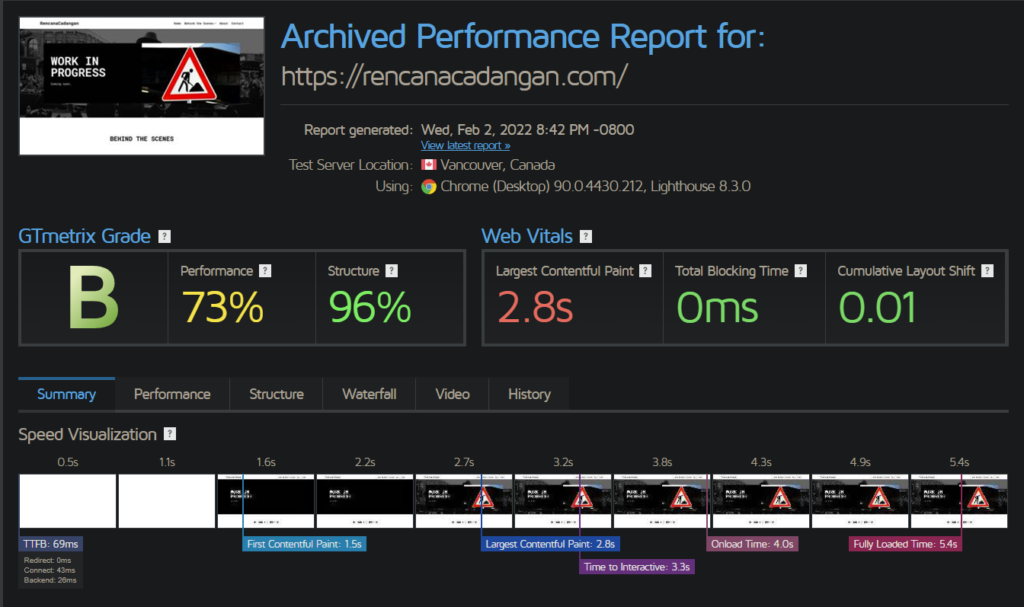
We were only scoring 73% on performance in GTMetrix tests. So we decided to do some caching work. We set up Cloudflare Workers based caching. https://wordpress.org/plugins/wp-cloudflare-page-cache/
Very interesting plugin. We set it up, crawled it a couple of times, and it improved our hot loading times like crazy.
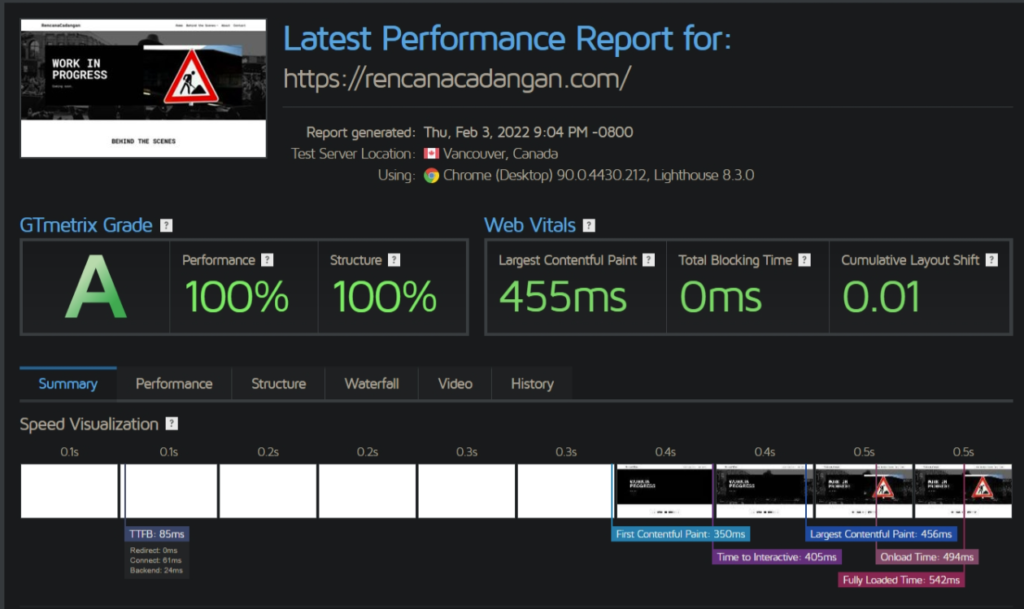
10/10 caching experience, would use for future websites, except that it’s limited to 100k requests/day. Definitely would like to explore more on Cloudflare Worker’s capabilities.
That’s all for my short self-hosting experience. Stay tuned for more website progress!
Saya hobi otak-atik computer. Jadi, sebagai pelajaran, says mengambil kesempatan menarik untuk mencoba hosting seluruh website WordPress ini secara manual. Bagaimana hasilnya? Menyenangkan? lumayan. Menyusahkan? pasti.
Pertama, web server. Memilih web server tidaklah terlalu susah. Saya sudah mencoba OpenLiteSpeed (OLS) dan NGINX untuk hosting WordPress sebelumnya. Saya menemukan OLS cukup untuk hosting website WordPress. Saya snediri memiliki instalasi WordPress dengan OLS, dan hanya menggunakan kira-kira memori ~70MB ketika tidak melakukan apa-apa, tidak termasuk MariaDB. Tetapi pada akhirnya, saya memutuskan untuk menggunakan OLS, karena saya memiliki terlalu sedikit pengalaman dengannya. Akhirnya, saya memutuskan untuk menggunakan NGINX.
Saya memasangkan NGINX dengan PHP-FPM 8.0, menhjalankan docker container untuk memenuhi kebutuhan WordPress. Docker container ada di sini. di bawah nama
ghcr.io/nathanadhitya/pterodactyl-wordpress:master Dalam proses membuat container docker, saya juga belajar untuk mempublish container docker secara otomatis pada container repository milik Github. Cukup menarik.
Selanjutnya, server database. Saya hanya menjalankan container MariaDB untuk kebutuhan ini. Mengejutkannya, database jalan tanpa membutuhkan konfigurasi berbelit-belit. Tetapi, latency agak lambat, karena cache InnoDB sangat kecil dikarenakan terbatas pada sumber daya memori.
Yang terakhir, domain dan CDN. Domain dibeli dari rumahweb.com. Saya menemukan rumahweb menawarkan domain .com termudah ditambahkan dengan ID protection. Saya telah menjadi pelanggan rumahweb lama, dan saya cukup puas dengan pelalayanan di sana. Saya menggunakan Cloudflare sebagai CDN dan reverse-proxy. Maka, saya harus mengubah NS untuk mengarah ke Cloudflare. Kemudian, rekor DNS dipindah ke IP server, dan et voila, semuanya berhasil.
Instalasi WordPress berjalan dengan lancar tanpa kendala. Cukup menyenangkan untuk kesuksesan di percobaan pertama, apalagi semuanya manual.
Ada cerita yang cukup konyol. Ketika sedang membuat website, kita menemukan sebuah masalah. Website nya terkadang akan crash dan tidak bisa dibuka ketika seseorang mengupload sebuah gambar. Hah? Gambar? Kenapa?
Ternyata, WordPress akan mengkompresi dan mengecilkan gambar menggunakan ImageMagick. Ternyata, ImageMagick adalah program yang cukup lapar akan memori dan akan memakan apapun sumber daya yang diberikan padanya. Uh-oh. Cukup frustrasi ketika Anda terbatas dalam sektor sumber daya. Bahkan, server saya sempat teriak-teriak kehabisan memori di kernel logs. :/
Pada akhirnya, kita menemukan letak kesalahannya. Container docker kami hanya kami assign memori sebesar 512MB, sementara ImageMagick berusaha untuk mengalokasikan memori sebanyak-banyaknya, dalam praktiknya, memori seluruh server. Ya, oke, tampaknya hal tersebut menjelaskan mengapa. Maka, kami menambahkan ImageMagick policies untuk membatasi penggunaan sumber daya ImageMagick. Yep, tampaknya masalah selesai.
Selanjutnya, kita berpikiran bahwa website kita kurang cepat. Bahkan, dengan optimisasi default yang telah diberikan oleh Cloudflare.
Kita menskor 73% di performance GTMetrix. Jadi, kita mengimplementasikan caching. Kita menggunakan Cloudflare Workers untuk meng-cache website kita. https://wordpress.org/plugins/wp-cloudflare-page-cache/
Plugin yang sangat menarik. Setelah kita siapkan, kita buka beberapa kali website kita, dan solusi caching tersebut membuat website kita sangat cepat.
Hore. Peningkatan yang cukup drastis dibandingkan sebelumnya, kecuali batasan 100k requests per harinya. Pelajaran yang cukup menarik, saya tertarik untuk memperdalami kemampuan Cloudflare Workers lebih dalam, nantinya.
Itu semua untuk pengalaman self-hosting saya. Nantikan konten baru untuk progress lebih lanjut! 🙂
Featured Image Photo by Josh Sorenson from Pexels. Thanks, Josh.
noice one there
What
This comment chain is getting interesting.